How Claude Code + Nia Achieved 38% Higher Pass Rate on Next.js Benchmarks
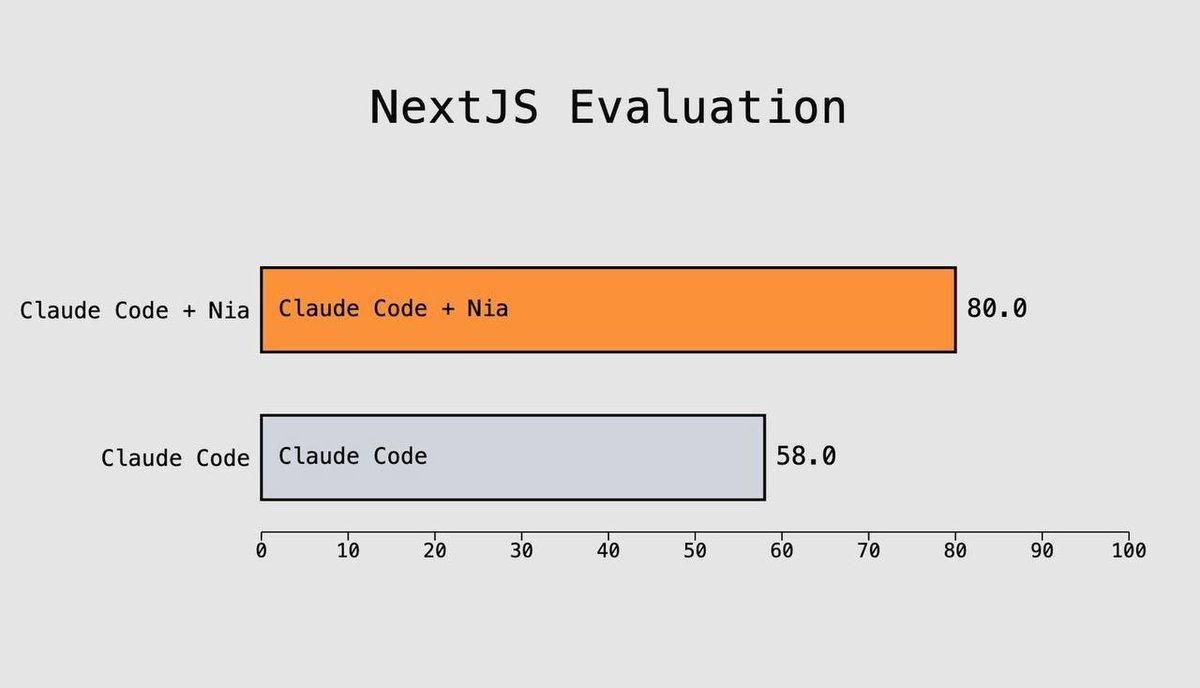
We ran benchmarks using Vercel’s public Next.js evaluation suite to test AI agent competency. Claude Code paired with Nia achieved an 80% pass rate compared to standalone Claude Code’s 58% — a significant improvement driven by grounding AI responses in official & up-to-date sources before writing code.
The Problem: AI Hallucination in Framework Code
Modern web frameworks like Next.js evolve rapidly. The App Router, Server Components, Server Actions, the 'use cache' directive, intercepting routes — these features have specific patterns and APIs that change between versions. When AI coding agents rely solely on training data, they often:
- Use outdated patterns — e.g.,
getServerSidePropsinstead of Server Components - Hallucinate APIs — inventing parameters that don’t exist
- Miss framework-specific conventions — like requiring Suspense boundaries for
useSearchParams
The hypothesis: What if we forced the AI to consult official documentation before writing code?
The Experiment Setup
The Benchmark: Vercel’s Next.js Evals
We used a modified version of vercel/next-evals-oss — a rigorous benchmark consisting of 50 real-world coding tasks.
| Category | Examples |
|---|---|
| Core Next.js | Server Components, Client Components, Route Handlers |
| App Router Patterns | Parallel Routes, Intercepting Routes, Route Groups |
| Data & Caching | Server Actions, 'use cache' directive, Revalidation |
| Best Practices | Prefer next/link, next/image, next/font |
| AI SDK Integration | generateText, useChat, tool calling, embeddings |
Each eval consists of:
- A Next.js project with failing tests
- A natural language prompt describing the task
- Validation via build + lint + test (binary pass/fail)
The Architecture
┌─────────────────────────────────────────────────────────────────┐
│                     EVALUATION PIPELINE                         │
├─────────────────────────────────────────────────────────────────┤
│                                                                 │
│   ┌─────────────┐     ┌─────────────┐     ┌──────────────┐     │
│   │  prompt.md  │────▶│ Claude Code │────▶│ File Changes │     │
│   └─────────────┘     └──────┬──────┘     └──────────────┘     │
│                              │                    │             │
│                              │ (with Nia)         │             │
│                              ▼                    ▼             │
│                       ┌──────────────┐    ┌──────────────┐     │
│                       │  Nia Search  │    │   Validate   │     │
│                       │  • Next.js   │    │   • Build    │     │
│                       │  • AI SDK    │    │   • Lint     │     │
│                       └──────────────┘    │   • Test     │     │
│                                           └──────────────┘     │
│                                                  │              │
│                                                  ▼              │
│                                           ┌──────────────┐     │
│                                           │  Pass / Fail │     │
│                                           └──────────────┘     │
└─────────────────────────────────────────────────────────────────┘
How Nia Integration Works
trynia.ai is a knowledge agent that provides AI models with access to up-to-date documentation through the Model Context Protocol (MCP). Here’s how we integrated it:
1. Pre-indexed Documentation Sources
# Pre-indexed documentation IDs
NIA_NEXTJS_DOCS_ID=a7e29fbd-213b-478a-9679-62a05023cffa  # Next.js docs
NIA_AISDK_DOCS_ID=4f80d3ee-e9e5-41f4-8593-faa63af93dd0   # AI SDK docs
2. MCP Server Configuration
A pre-eval hook dynamically configures the Nia MCP server:
# nia-mcp-pre.sh
cat > "$OUTPUT_DIR/.mcp.json" <<EOF
{
  "mcpServers": {
    "nia": {
      "type": "stdio",
      "command": "pipx",
      "args": ["run", "--no-cache", "nia-mcp-server"],
      "env": {
        "NIA_API_KEY": "$NIA_API_KEY",
        "NIA_API_URL": "$NIA_API_URL"
      }
    }
  }
}
EOF
3. Enhanced Prompt Strategy
When --with-nia is enabled, the prompt is enhanced to require documentation search before implementation:
enhancedPrompt = `IMPORTANT: Before writing ANY code, you MUST search the
relevant documentation using Nia MCP tools.

## Available Documentation Sources:

1. **Next.js Documentation** (ID: ${niaNextjsDocsId})
   - Use for: App Router, Server Components, Server Actions, etc.

2. **AI SDK Documentation** (ID: ${niaAisdkDocsId})
   - Use for: generateText, useChat, tool calling, embeddings, etc.

## Required Documentation Search Steps:

1. Analyze the task to determine which documentation source(s) you need
2. Search for relevant documentation using 'search' or 'nia_grep'
3. Read relevant pages using 'nia_read'
4. ONLY THEN implement the solution following best practices from the docs

---

## Your Task:

${originalPrompt}`;
The Results
Overall Performance
| Configuration | Passed | Failed | Pass Rate |
|---|---|---|---|
| Claude Code + Nia | 40 | 10 | 80% |
| Claude Code (Baseline) | 29 | 21 | 58% |
Improvement: +11 evals, 38% relative improvement
Detailed Breakdown: What Improved?
The evals that passed with Nia but failed without it reveal exactly where documentation grounding helps:
| Eval | Task | Why Documentation Helped |
|---|---|---|
014-server-routing | Server-appropriate navigation | Docs clarify when to use redirect() vs useRouter() |
017-use-search-params | useSearchParams with Suspense | Docs specify the required Suspense boundary pattern |
029-use-cache-directive | 'use cache' with cache tags | New API requires exact syntax from documentation |
032-ai-sdk-model-specification | AI SDK model initialization | API format requires current documentation |
040-intercepting-routes | Intercepting routes (.)/path | Complex convention requires docs reference |
Example: The ‘use cache’ Directive
This eval asks Claude to implement caching with selective invalidation:
Implement efficient data caching with selective invalidation:
- Create a component that fetches data using the
'use cache'directive- Include cache tags for selective invalidation
- Add a form with server action that invalidates the cache
Without documentation: Claude might use outdated caching patterns or guess at the API.
With Nia: Claude first searches for 'use cache' in the Next.js docs, reads the current API specification, then implements correctly:
'use cache'
import { cacheTag } from 'next/cache';

async function ProductList() {
  cacheTag('products');
  const products = await getAllProducts();
  // ...
}
Why This Matters
1. Reduced Hallucination
By grounding responses in official documentation, the AI is less likely to invent APIs or use deprecated patterns. This is particularly important for:
- Rapidly evolving frameworks — Next.js, React
- New features — Server Components, RSC payload, turbopack
- Complex conventions — file-system routing, intercepting routes
2. Version Awareness
Documentation is indexed with version information. When Next.js 15 introduces breaking changes, the AI consults Next.js 15 docs — not training data from Next.js 13.
3. Deterministic Accuracy
Instead of probabilistic recall from training, the AI performs deterministic lookup. For questions like “what’s the exact API for cache invalidation?”, documentation search provides the authoritative answer.
The Technical Implementation
Claude Code Runner Architecture
The evaluation framework spawns Claude Code as a subprocess with MCP configuration:
class ClaudeCodeRunner {
  private async executeClaudeCode(projectDir: string, prompt: string) {
    // Check for MCP config
    const mcpConfigPath = path.join(projectDir, '.mcp.json');
    const mcpConfigExists = existsSync(mcpConfigPath);

    const args = [
      ...(mcpConfigExists ? ['--mcp-config', mcpConfigPath] : []),
      '--print',
      '--dangerously-skip-permissions',
      enhancedPrompt
    ];

    const claudeProcess = spawn('claude', args, {
      cwd: projectDir,
      env
    });
  }
}
Evaluation Scoring
Each eval is scored based on three binary checks:
const evalResults = await this.runEvaluation(outputDir);

// Score calculation
const buildScore = result.buildSuccess ? 1.0 : 0.0;
const lintScore = result.lintSuccess ? 1.0 : 0.0;
const testScore = result.testSuccess ? 1.0 : 0.0;
const overallScore = buildScore * lintScore * testScore;  // All must pass
Nia Tools Available to Claude
| Tool | Purpose |
|---|---|
search | Semantic search across indexed documentation |
nia_explore | Browse documentation structure (tree/ls) |
nia_grep | Regex search in documentation content |
nia_read | Read specific documentation pages |
Running the Benchmark Yourself
# Clone and setup
git clone https://github.com/nozomio/next-evals-oss
cd next-evals-oss
pnpm install

# Set environment variables
export ANTHROPIC_API_KEY="your-anthropic-key"
export NIA_API_KEY="your-nia-key"
export NIA_NEXTJS_DOCS_ID="a7e29fbd-213b-478a-9679-62a05023cffa"
export NIA_AISDK_DOCS_ID="4f80d3ee-e9e5-41f4-8593-faa63af93dd0"

# Run baseline (Claude Code only)
bun cli.ts --all --claude-code

# Run with Nia
bun cli.ts --all --claude-code --with-nia --with-hooks nia-mcp
Conclusion
The results demonstrate a clear pattern: AI coding agents perform measurably better when grounded in official documentation.
The 38% relative improvement (58% → 80%) isn’t just about passing more tests — it’s about:
- Reliability — Using documented APIs rather than hallucinated ones
- Maintainability — Code that follows current best practices
- Confidence — Developers can trust the generated code more
As frameworks continue to evolve faster than model training cycles, documentation grounding becomes not just helpful, but essential.
Built with Claude Code and Nia. Benchmark based on vercel/next-evals-oss.